MarkTechPost ↗ · 2026-11-19 11:23 · UTC+8
 营养数据提取 API:符合您模式的 JSON 并提供逐字段引用和置信度
媒体报道 MarkTechPost 原文语言:英文
LLM 有时会把文档中错误的数值当作事实返回,这在基于这些信息做决策时代价高昂。营养数据提取 API 正是为了解决此类错误而设计,提供每个字段的来源引用和置信度评分,以帮助用户验证和纠正提取结果。
全文
LLM 向您呈现了一个从文档中提取的错误数值并将其视为事实。这种错误代价高昂,尤其是在基于它做决策时。Nutrient 数据提取 API 正是为了解决该问题。它将 PDF、扫描件、图像和 Office 文件解析为空间 JSON 或 Markdown。将文档中的字段映射到您的 JSON 架构,并通过拆分、分类和表单端点提供有用的原语用于文档流水线。每个提取的值都通过边界框、匹配标签和置信分数锚定到页面。Nutrient(前身为 PSPDFKit)在 MCP 服务器、代理技能、Mac 应用和 SDK 背后运行相同的引擎。
TL;DR
规模:提供 4 种解析模式加自动路由的托管 API。
运行于:Nutrient 云、通过 SDK 部署在您自己的服务器上,或在 Apple Silicon Mac 上。
试用地点:Studio,一个用于配置和测试解析、提取、分类、拆分以及表单填充的浏览器工作区。
性能:在 Nutrient 的 WholeDoc Bench 上整体得分 86.2,位列 19 种设置之首(实时 API,Agentic)。
最佳:每页 1.8¢ 时得分 86.2,相比最佳前沿模型设置每页 17.8¢ 的 67.1。
如何在编写代码前在 Studio 中测试?
Studio 是 Nutrient 的浏览器工作区,用于在将 API 集成到您的应用之前配置和测试 API。它让您能够在自己的文件上测试解析、提取、分类、拆分和表单填充。典型流程:
上传示例文档并设置您计划发送的参数。
在 UI 中草拟架构,或基于您自己的文档生成架构。
在新文档上运行,然后检查数值和引用。
将设置保存为有版本的预设。API 将其称为 processor,带有 proc_ ID。
在最多 25 份已审阅文档的评估集上对预设版本进行评分。
保存在 Studio 中的 processor 可通过 ID 从 API 调用。
应该选择哪种模式?
自动将每页路由到结构、理解或 agentic。如果未指定模式,API 默认使用 understand。
OperationBest forPrice per pageExtract per pageWholeDoc Bench*
Parse: textBorn-digital PDFs and Office files, no OCR$0.001$0.007**Not tested
Parse: structureOCR for scans with simple layouts, no AI$0.0015$0.007539.4
Parse: understandAI layout analysis: forms, complex layouts$0.009$0.01580.8
Parse: agenticVision language model: cursive, degraded scans, charts$0.018$0.02486.2
ClassifyZero-shot document labels$0.001n/an/a
SplitSeparating merged PDFs into documents$0.003n/an/a
*WholeDoc Bench parsing score, 5 November 2026; not extraction accuracy. Extract adds $0.006 per page. **API docs list text-mode extract; the agent skill starts at structure.
Pricing is in dollars, from 1 balance shared across Nutrient’s cloud APIs, so teams can mix and match. The free plan gives you $5 monthly usage that covers about 330 understand-mode extractions. Starter costs $75 a month for $90 of usage; Growth costs $275 for $345.
How does grounded confidence work?
In Nutrient’s confidence post, a field scored 0.97 but came from the wrong column.
The current score is a composite of optional signals: token probability, candidate margin, grounding and format. Nutrient’s NLI grounding model is open under Apache-2.0. A grounded value can still answer the wrong field. When no score exists, confidence is omitted, not low.
Each field also gets a match label: id_match, id_match_multiblock, id_match_partial, fuzzy_match or not_found. Gate on the label first, then confidence.
Copy CodeCopiedUse a different Browser
import json, requests API_KEY = "your_api_key" schema = { "type": "object", "properties": { "invoice_number": {"type": "string", "description": "供应商详情下方的发票号码。"}, "total_amount": {"type": "number", "description": "打印的最终总额,包括税金。不是小计。"}, }, "required": ["invoice_number", "total_amount"], } instructions = {"schema": schema, "parseConfig": {"mode": "understand"}, "options": {"includeCitations": True}} with open("invoice.pdf", "rb") as f: r = requests.post( "https://api.nutrient.io/extraction/extract", headers={"Authorization": f"Bearer {API_KEY}"}, files={"file": ("invoice.pdf", f, "application/pdf"), "instructions": (None, json.dumps(instructions), "application/json")}, timeout=300, ) r.raise_for_status() out = r.json()["output"] data, metadata = out.get("data") or {}, out.get("metadata") or {} EXACT = {"id_match", "id_match_multiblock"} THRESHOLD = 0.97 # 仅作示例;请在代表性文档上评估 for field in schema["properties"]: # 循环预期字段,确保不遗漏 review value = data.get(field) meta = metadata.get(field) or {} match, conf = meta.get("match"), meta.get("confidence") # None = 无分数 passes = (value is not None and match in EXACT and conf is not None and conf >= THRESHOLD) print(field, value, match, conf, "page", meta.get("pageNumber"), "PASSES_BASIC_CHECKS" if passes else "REVIEW")
此演示仅覆盖平面模式;生产环境需要类型和业务规则检查。0.97 的阈值对应 Nutrient 抵押贷款教程中的金额字段。
如何进行分类和拆分?
文档决策模型驱动分类和拆分。Nutrient 报告的拆分 F1 为 96.2%,而 Typesafe AI 的 Jev 为 63.7%。
代理如何使用它?
托管的 MCP 服务器无需 API 密钥。Claude Code 只需一条命令即可连接:
复制代码已复制使用其他浏览器
claude mcp add --transport http --scope user nutrient https://mcp.nutrient.io/mcp
Claude 和 Codex 也可通过 OAuth 使用。默认的代理模式解析每页费用为 $0.018。
编码代理可以使用 npx skills add pspdfkit-labs/nutrient-skills –skill document-extraction-api 安装 document-extraction-api 技能。
它可以本地运行吗?
在 Mac 应用中,文档仅在本地模型下保持本地。完全离线的生产环境需要使用 SDK。
它在 WholeDoc Bench 上的得分如何?
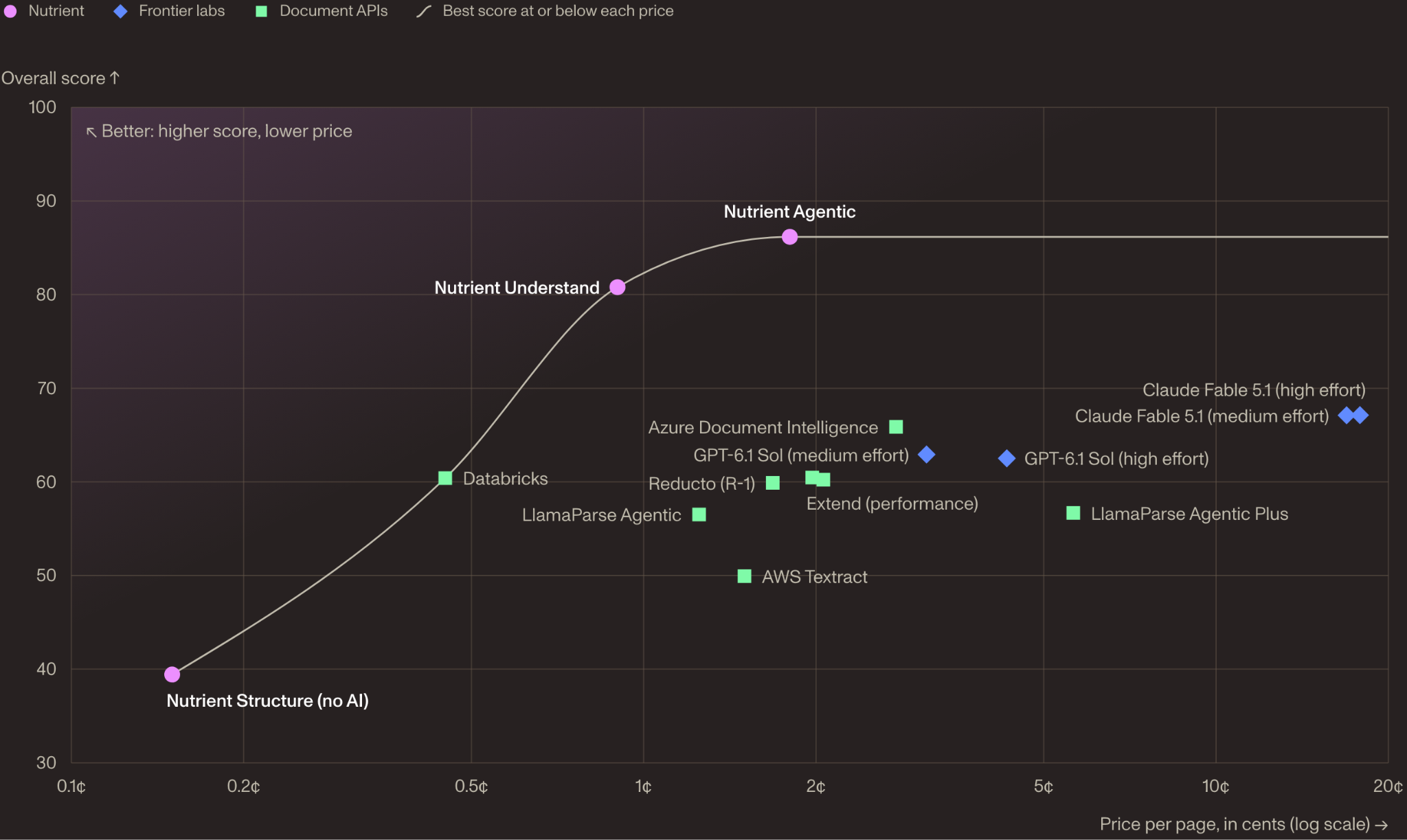
Nutrient 的新 WholeDoc Bench 对整篇文档进行评分,而非单页:480 份文档,30 多种语言,7 个领域。
SettingOverallTablesChartsPosition¢/page
Nutrient Agentic86.287.164.588.61.8
Nutrient Understand80.886.135.186.40.9
Claude Fable 5.1 (high effort)67.184.758.966.017.8
Azure Document Intelligence65.969.4072.5≈2.8
GPT-6.1 Sol (medium effort)62.982.847.649.3≈3.1
Extend (performance)60.580.840.675.22.0
Reducto (R-1)59.976.438.576.4≈1.7
LlamaParse Agentic Plus56.789.50*65.4≈5.6
AWS Textract49.971.4070.01.5
Docling40.063.920.20Local
选定行,WholeDoc 排行榜,2026 年 11 月 5 日,列表价格。*分数仍在审查中。
跨页连续性是最大差距。在 44 份包含跨页表格的文档中,19 种设置中有 15 种很少保持完整。
Nutrient 构建并运行了该测试,主要测试集为私有。代码采用 Apache-2.0 许可证,并提供 10 份文档的公开样本。
关键要点
字段携带页面、区域、匹配标签以及(如果有)置信度。
在编写任何 API 代码之前,请在 Studio 中进行配置和测试。
Understand 模式的提取费用为每千页 $15。
Agentic 以每页 1.8¢ 的成本在 Nutrient 的 WholeDoc Bench 中排名最高,得分 86.2。
图表仍然困难:64.5 是最佳 WholeDoc 图表得分。
请在 GitHub 上查看数据提取 API、基准测试、MCP 服务器和代理技能。
感谢 Nutrient AI 团队提供的思想领导力/资源撰写本文。本文为赞助内容。
正文为 AI 译文。
参考来源